
Metro World2.3 - App Store
You'll be able to see results in few seconds.
Publisher Description
WATCH THE VIDEO OF METRO WORLD HERE: http://www.youtube.com/watch?v=8gUuz9eMyOw
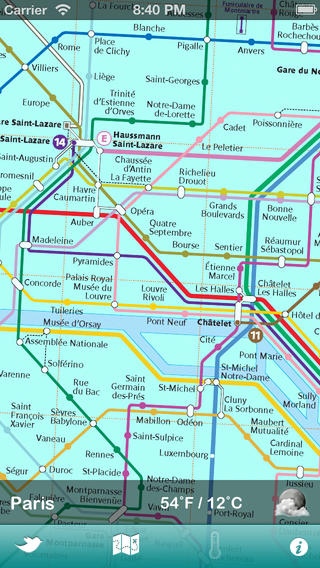
Metro World is an Universal Subway Map and has unique features and technology for subway users. Wherever you go the app downloads automatically the subway map more adequate for your current position. It does it immediately and only once, when you arrive to a new city. Since then you have always the map at your fingertips - and you can even disable Cellular Data -, until you move to another town, where you immediately get a new map!
You have also a meteo icon which gives you the meteorological forecast for the current day at the selected location, and the current temperature in Celsius and Fahrenheit degrees.
(GREAT FEATURE: the download happens only once, when you arrive to a new city with a subway and after that you can stay offline !!!! ).
If you do not find the subway of your city, send us an e-mail (objectouch@me.com) requesting it. You will have it available in 1 or 2 days!
Right now the following subway maps are available:
Athens
Atlanta
Barcelona
Beijing
Berlin
Boston
Buenos Aires
Cairo
Caracas
Chicago
Dusseldorf
Hong Kong
Istambul
Lisbon
London
Los Angeles
Madrid
Melbourne
Mexico City
Milan
Moscow
Mumbai
Munich
Naples
New York
Paris
Prague
Rio de Janeiro
Rome
San Francisco
Santiago de Chile
Sao Paulo
Seoul
Shanghai
Sidney
Stockholm
St. Petersburg
Tokyo
Toronto
Valencia
Vancouver
Washington
Wien
Zurich
Requires iOS 6.0 or later. Compatible with iPhone, iPad, and iPod touch.
About Metro World
The company that develops Metro World is Luca Zapparoli. The latest version released by its developer is 2.3.
To install Metro World on your iOS device, just click the green Continue To App button above to start the installation process. The app is listed on our website since 2011-12-09 and was downloaded 0 times. We have already checked if the download link is safe, however for your own protection we recommend that you scan the downloaded app with your antivirus. Your antivirus may detect the Metro World as malware if the download link is broken.
How to install Metro World on your iOS device:
- Click on the Continue To App button on our website. This will redirect you to the App Store.
- Once the Metro World is shown in the iTunes listing of your iOS device, you can start its download and installation. Tap on the GET button to the right of the app to start downloading it.
- If you are not logged-in the iOS appstore app, you'll be prompted for your your Apple ID and/or password.
- After Metro World is downloaded, you'll see an INSTALL button to the right. Tap on it to start the actual installation of the iOS app.
- Once installation is finished you can tap on the OPEN button to start it. Its icon will also be added to your device home screen.
Program Details
System requirements
Download information
Pricing
Version History
version 2.3
posted on 2011-12-09
Disclaimer
Official App Store Link
We do not host Metro World on our servers. We did not scan it for viruses, adware, spyware or other type of malware. This app is hosted by Apple and passed their terms and conditions to be listed there. We recommend caution when installing it.
The App Store link for Metro World is provided to you by apps112.com without any warranties, representations or guarantees of any kind, so access it at your own risk.
If you have questions regarding this particular app contact the publisher directly. For questions about the functionalities of apps112.com contact us.
